
If you purchased Elite Dangerous: Horizons using Frontier’s website but want want to play it using Steam’s launcher…read on
I like to keep all my PC games in one place…namely Steam. It means I don’t have to remember anything and can replace the computer as and when I like without having to worry about who I purchased a game from. It also means they all run from one place. Unusually, I pre-ordered Elite Dangerous:horizons from the Frontier site to take advantage of the discount. It’s now been released (on Frontier as well as Steam) but it didn’t show up as an option when I launched from Steam.
Apparently this has a lot of people confused and there are multiple very long threads on the Elite forums about how to transfer your ownership of the game from Frontier to Steam. Most of the threads involve copying and pasting files around, downloading a second copy of the game, overwriting launch files and other madness…
The easiest way to do it is to use the Partner Keys feature of the frontier store website:
- Login to https://www.frontierstore.net using the credentials you created when buying Elite Dangerous: Horizons
- Go to “My Account” > “Account Dashboard”
- On the left hand side, click on “Partner Keys”
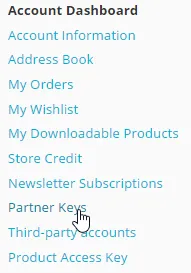
Finding your key for Elite Dangerous: Horizons
- Log into Steam using your Steam credentials (this will link your Steam account to Frontier so you can use them to log into there too in future)
- You will see an option to redeem your steam key for Elite Dangerous: Horizons – click it
- Copy the displayed key
- In Steam, go to “Games” > “Activate a Product on Steam ” using the top menu
- In the product Activation dialog that appears, click “Next” and then “I Agree”, it will then prompt you for the product code
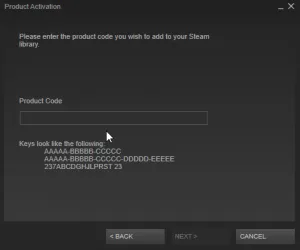
Activating a product in Steam using Frontier Developments Partner Key
- Paste the Key you copied earlier
- You can now find the Elite Dangerous game in your steam library
- If you double click it, it will start installing as per usual